Notepad++ Portable 6.2.3
 has been released. It's the handy Notepad++ text editor packaged as a
portable app
so you can do your development on the go. It has all the same great
features of Notepad++ including support for multiple languages and an
extensive plugin system, but there's nothing to install. This release
updates Notepad++ to the latest release and improves portablization when
running from cloud drives. It's packaged in PortableApps.com Format so
it can easily integrate with the
PortableApps.com Platform. And it's open source and completely free.
Features

Notepad++ Portable is a full-featured text editor with features like:
- Syntax Highlighting and Syntax Folding (C, C++, HTML, ASP, Java, Pascal, CSS and more)
- User Defined Syntax Highlighting
- Auto-completion
- Multi-Document
- Regular Expression Search/Replace supported
- Full Drag ‘N' Drop supported
- Zoom in and zoom out
- Multi-Language environment supported
- Brace and Indent guideline Highlighting
- Macro recording and playback


size: 5.7 MB
GOM Media Player Features
Codec Finder
GOM Player includes many codecs (XviD, DivX, FLV1, AC3, OGG, MP4, H263 and more) so you won't need to install separate codecs for most videos. For those videos that require a separate codec, GOM Player will find one and direct you to a place where you can download an open source version of the codec. That way, you won't get stuck with unnecessary codecs on your system.
Play Broken AVI Files (Patented)
AVI files can't be played if the index is broken, or if the file isn't completely downloaded. This is because the index is located at the end of the file. GOM Player's patented technology enables users to view files with broken indexes or that are still being downloaded.
Powerful Subtitle Support
GOM Player supports SMI, SRT, RT, SUB(with IDX) files for subtitle. You can specify margin, location, size, resolution, font and others. You can also enable shadow, view ASF files with subtitle, karaoke subtitle mode. You can even synchronize subtitle and video if there's any mismatch.
Convenient Playlist
If you run a video file and there is already a file with a similar name in the directory, it will be automatically added to your playlist. GOM Player has a similar playlist format as M3U, PLS, ASX and you can also include and edit different media formats on that playlist as well. It's easy to create and edit your own multimedia playlist with GOM Player.
Support Different Media Types
Along with different media format such as AVI, MPG, MPEG and DAT, GOM Player also supports streaming Windows media format (WMV, ASF, ASX). You can also watch DVD-quality videos with 5.1 channel audio output.
Screen Capture
Screen capture allows you to take a screenshot of your video directly from GOM Player. Using the Burst Capture feature, you can take continuous screenshots up to 999 shots.
Advanced Features
There are an endless number of advanced features. Customize brightness, contrast and saturation. Sharpen and add noise to your video. Try the audio equalizer. Repeat a section of your video with our A-B Repeat feature. Fast forward/rewind a few seconds using left/right keys. And much more for you to discover!

GOM PLAYER is compatible with windows 7
System Requirements
- Microsoft Windows 98SE, Me, 2000, XP, 2003 or Vista
- Intel-compatible CPU P3 or greater Minimum amount of RAM recommended by the operating system in use 20MB Hard Drive Space.
- Some videos may require the newest version of DirectX or Windows Media Player.
- Recommended settings may change according to different types of video files.
- Modify 'Deadlock problem' occasionally happened when you shut down the player.
- Improve Vorbis audio decoder performance.
DOWNLOADS HERE:
http://www.ziddu.com/download/7158175/GOMPlayer2.1.18.4762.rar.html

Save money on paper and ink, extend the life of your printers, reduce storage space and shipping costs! FinePrint is an award-winning printer utility that significantly reduces costs, enhances and manages complex print jobs and fixes pesky print problems. Using FinePrint is as easy as selecting it as the printer in any application's Print dialog box. Reduce printouts to as little as 1/8 of their original page size — with perfect legibility. Combine mutiple documents from different applications into a single print job. FinePrint saves you money on paper and toner, weight in your briefcase, and time and hassle in managing your print jobs. With FinePrint working for you, annoying printing problems disappear. Below are just some examples of printing problems that FinePrint can fix. See also our Enterprise section for benefits of FinePrint in the Enterprise.
- Delete unwanted pages - Print multiple pages on a sheet - Combine multiple print jobs into one - Print on electronic letterhead - Archive print jobs
Other features: - Mark documents with custom watermarks such as "draft" or "confidential". - Create custom electronic letterhead and forms. No more buying, storing and manually loading pre-printed letterhead. - Page numbering over multiple documents including Bates stamping - Output pages to clipboard - Save pages in JPEG, TIFF and text formats
Download link 1

phpDesigner 2008 is your PHP IDE and PHP editor for all your PHP and Web development with support for PHP object-oriented programming, PHP frameworks, debug with Xdebug, remote ftp-editing and hundreds other cool features!
Introduction
phpDesigner 2008 is today's PHP IDE and PHP editor - the complete integrated development environment for PHP for both beginners and professional developers that help you boost the process of editing, analyzing, debugging and publishing applications and websites powered by PHP and other web languages!
Boost your productivity
phpDesigner 2008 is designed to boost your productivity and simplify complex coding projects through intelligent set of editing tools that includes full support for PHP4/PHP5, syntax highlighters, highlighting of matching tags/braces and numerous tools and wizards to speed of your development!
Intelligent syntax highlighting
The intelligent syntax highlighter in phpDesigner 2008 makes it the ideal development environment for AJAX developers. Automatic switch between syntax highlighters for PHP, HTML, CSS, and JavaScript dependant on your position in the file and dim the rest of the code!
PHP, HTML, CSS, JavaScript and more...
phpDesigner 2008 has the WAMP and LAMP developer in mind. The strength in PHP lies in the ability to embed it into- and together with other web-languages and technologies.
Therefore, does phpDesigner 2008 not only support PHP but also other web-languages as HTML, XHTML, MySQL, XML, CSS, JavaScript, VBScript, Java, C#, Perl, Python and Ruby!
PHP Object-oriented programming (OOP)
In phpDesigner 2008 you can work with object-oriented programming (OOP) in PHP5, nested code completion and have code tip displayed as you type so you do not need to look into documentation to see classes and function attributes!
Work with projects and PHP frameworks
In phpDesigner 2008 you can work with projects and integrate any PHP framework into your project and access all your files, classes, functions, interfaces, variables and constants declared in your project on the fly!
Real debugging using Xdebug
Debugging has never been easier with the new integration of Xdebug in phpDesigner 2008.
Analyze your code step by step using breakpoints, watches, evaluations etc. Find bottlenecks in your code or see which parts of your code are slow and could use a speed boost with the profiler support!
Learn PHP
Explore the world of PHP and shorten the learning curve with detailed information about more than 3000 native PHP functions on the fly!
Enjoyable to use for hours and hours!
The philosophy behind phpDesigner 2008 is to make it, enjoyable to use for hours and hours for both beginners and professional developers through an easy-to-use-, intuitive-, customizable- and tabbed interface!

download version: 6.2.4

Nero 9 is the next generation of the world’s most trusted integrated digital media and home entertainment software suite. It features new cutting-edge functionality that makes enjoying digital media content simple.
This easy-to-use yet powerful multimedia suite, gives you the freedom to create, rip, copy, burn, edit, share, and upload online. Whatever you want – music, video, photo, and data – enjoy and share with family and friends anytime, anywhere.
With easy-to-use Nero StartSmart command center, your digital life has never been more flexible, feasible, and fun.
Nero 9 Highlights:
Fast and easy rip, burn, Autobackup, and copy functions
Backup files to CDs, DVDs, and Blu-ray Discs*
Create professional-looking DVD movies with integrated 3D menus
Copy, burn, share, upload, and create music mixes like a DJ
Convert music, photos, and DVDs to play on your iPod® and other mobile devices
Quick photo and video upload to My Nero, YouTube™, and MySpace
Watch, record, pause, and customize your live TV experience
Play AVCHD and other HD formats
Creative Projects Are Easier than Ever
Using the intuitive Nero StartSmart command center of Nero 9, your digital life has never been more flexible, feasible, and fun. You directly access features and perform one-click functions such as Audio Ripping, Burning, Copying, and AutoBackup, with optimized performance for Windows Vista® with Nero DiscCopy Gadget.
Fully Enjoy Your Content at Home, Online and On-the-go
Whether it’s video, photo, or music, you can convert and share everything your imagination creates in your digital world. Convert & share multimedia files to play on iPod®, PSP®, and upload online your coolest photos and videos to share with online communities like My Nero, YouTube™, and MySpace.
Make Your PC a Dynamic Home-Entertainment Device
Experience TV from the comfort of your sofa with state-of-the-art TV technology, even for HDTV and DVB Radio. Pause, record, schedule, manage, and playback your TV shows.
Best in the Business Software Gets Better
The ripping and burning capabilities of Nero 9 are the most reliable in the industry. Burn and copy to CD, DVD, Blu-ray Disc – even copy movies*. With DVD-R Dual Layer and DVD+R Double Layer support, you’ll get more data on a disc than ever before!*
Trusted and Reliable – Backup, Restore, and Secure
Don’t lose your valuable memories and important files to life’s potential hazards, system crash, or risky hardware. Backing up, securing, and managing files and data is a point-and-click away.
download
size: 52MB
http://www.ziddu.com/download/3442567/Nero.9.0.9.4c.Lite.part1.rar.html http://www.ziddu.com/download/3442655/Nero.9.0.9.4c.Lite.part2.rar.html http://www.ziddu.com/download/3442851/Nero.9.0.9.4c.Lite.part3.rar.htmlhttp://www.ziddu.com/download/3442974/Nero.9.0.9.4c.Lite.part4.rar.html http://www.ziddu.com/download/3443169/Nero.9.0.9.4c.Lite.part5.rar.html http://www.ziddu.com/download/3443194/Nero.9.0.9.4c.Lite.part6.rar.html
Source Code Library is a powerful multi-language source code Library and clipboard extender with the following benefits:
- Built-in library with 50,000++ lines of code
- Fully support more than 30 programming languages
- Manage your source code in a single, Secure place
- Password protection & strong 448 bits encryption (optional)
- Full integration with *all* major programming IDEs
- Boost your productivity with its powerful clipboard extender and AutoText utility
And much more!
Quickly
search for code, using a
simple hotkey!
Multiple websites & search engines supported (
fully customizable list!)


Built-in
Clipboard Extender, quickly paste your frequently used code snippets, launch your favorite applications and URLs and more!
You can use the
clipboard menus to paste collected code back to
any windows application,
launch your favorite
application, folder or website, and more!

Quickly
capture important data. Perfect for
Internet research!
Press
CAPS-Lock twice anywhere to quickly & silently
add clipboard content on-the-fly. Perfect for Internet research.

More than
10,000 lines of open source & free
source code included!
You don't have to start from scratch, plenty of task-oriented code snippets & components covering most programming subjects are available to you for
FRE download here
oner Photo Studio complements your photo workflow perfectly. Why waste time using multiple programs and ineffective techniques to edit and organize your photos? Zoner Photo Studio makes editing, defect correction, retouching and creating interesting effects straightforward and painless and gives you astonishing results – whether you are working with one photo or taking advantage of the advanced batch processing capabilities. Organize your photo archive simply and effectively! The broad array of tools and features and the support of industry standards in Zoner Photo Studio will help you achieve your digital photo goals. You’ll quickly get your bearings in Zoner Photo Studio and will appreciate its flexibility.
Zoner Photo Studio was created for photographers who need a large and flexible toolkit supported by the latest in digital photography technology. The new editing Layer introduces a wealth of options to your workflow. Take full advantage of industry standards (RAW, HDR, DNG, 16-bit/channel, EXIF, IPTC, XMP and more), and SSE and MMX processing technologies as well as support for the power of multi-core processors. Thanks to 48 bit color depth you’ll ensure the highest photo quality, and the latest algorithms keep your colors true to life with wall-to-wall color management. You can depend on Zoner Photo Studio!
Efficient, precise and simpleIt’s all about quality results and time – your time. That’s why you need Zoner Photo Studio for your workflow. Whether you are working with one photo or many from a large photo shoot, you want perfection and you don’t have time to waste. The wide range of editing features in Zoner Photo Studio ensures results that you and your clients will be proud of. You’ll save time with the great batch processing settings that will make your workflow even more efficient. Zoner Photo Studio makes editing and defect correction on many photos just as straightforward as if you were processing one photo. In addition, you can create and save templates to make any combination of edits to any set of photos. And the new editing Layer will improve your workflow. Of course, all of the editing features in Zoner Photo Studio Professional Edition support 16 bit per channel color depth and our outstanding color management minimizes loss of image quality.
Your path to perfect photosEven the best photographer can run into bad conditions. Poor lighting, troubles with finding proper composition, hurrying to catch a unique moment, distracting elements in the middle of the scene… at one time or another we’ve all run into problems beyond our control. Zoner Photo Studio gives you powerful editing tools to give your photos the right light, color, sharpness, and shine. With Zoner Photo Studio, you’ll have everything that you need to get perfect photos!
Manage your photos and metadataPhotos! Photos! Photos! Filling up your computer hard drive - and no end in sight! Sorting and organizing a photo archive is the nightmare of many photographers. With Zoner Photo Studio, you are in control.
With all the work you do with photos, you know that there is more to a digital photo than just the picture. Metadata – it’s the invaluable information behind the photo: descriptions, how it was taken, data from RAW files, even GPS data! Zoner Photo Studio makes sure it is all there for you. Zoner Photo Studio makes assigning information to photos simple and efficient, no matter if you’re labeling one photo or one thousand: search on any of the metadata bits that were included by your camera or added by you. You can even view the metadata while browsing your photo thumbnails. With Zoner Photo Studio, you will never lose track of your photos’ metadata.
The reliable archive: standards and protectionAdding information is easy in Zoner Photo Studio, but how about making sure that the metadata doesn’t get stripped or lost? And that’s no small thing: some programs will actually remove information during tasks as basic as rotating your photos. With Zoner Photo Studio your information will be safe and Zoner Photo Studio can even backup your metadata. It also stores information in all three information standards—EXIF 2.2, IPTC, and XMP. Furthermore, Zoner Photo Studio is Unicode-friendly. That means your photo descriptions will look right no matter where in the world you call home. Zoner Photo Studio also makes it easy to keep track of photos from a variety of sources - from all your cameras to even mobile phones and other devices – and bring them together into one well-organized whole. Zoner Photo Studio can even include your photo archive of your CDs and DVDs.
Quality where it counts: everywhere!If you are serious about digital photography, you know how critical it is to maintain the highest quality throughout your workflow. At Zoner Software, we understand quality and workflow. If your digital photo processing software doesn’t support the highest quality at each step of your workflow, your photos aren’t going to look their best. Each and every tool in Zoner Photo Studio used for editing, problem fixing, retouching, and filter masks supports 16 bits per channel color depth. With Zoner Photo Studio, you won’t have to worry about picture quality degradation caused by your photo processing software! Focus on making great photos and we’ll do the rest!
Industry standards: we’ve got you covered!Avid photographers love the quality and additional processing capabilities that come with RAW files. These are practically synonymous with the highest-quality digital photos. RAW files hold all the metadata that was stored on the camera’s chip at the instant when the picture was taken. Zoner Photo Studio offers you a full suite of tools for processing RAW files from more than 150 camera types, so you can do everything from preview browsing to customized conversion (developing) of pictures into other editable formats. Naturally, Zoner Photo Studio supports the new DNG universal digital negative format!
Size : 59 MB
Code:
http://uploading.com/files/RE3107F4/Zoner Photo Studio Enterprise v11.0.1.8.rar.html
Or
Code:
http://uploadbox.com/files/e0kfn89gjM
Or
Code:
http://www.easy-share.com/1903375720/Zoner%20Photo%20Studio%20Enterprise%20v11.0.1.8.rar
FileMaker Pro is the #1-selling easy-to-use database software for Windows and Mac OS that helps you manage people, projects, assets and more — the easy way!
FileMaker Pro 9 Advanced includes all the features of FileMaker Pro 9 plus a suite of advanced development and customization tools to help you design and develop more powerful, more customized database applications – faster and easier than ever before!
More Info:
Code:
http://www.filemaker.com/products/fmpa/
Rapidshare Code:
http://rapidshare.com/files/82385207/FileMaker.Pro.v9.0v3R3.WinALL.Multilanguage.Cracked-NGEN---news0day.net---.part1.rar.html
http://rapidshare.com/files/82369075/FileMaker.Pro.v9.0v3R3.WinALL.Multilanguage.Cracked-NGEN---news0day.net---.part2.rar.html
http://rapidshare.com/files/82371711/FileMaker.Pro.v9.0v3R3.WinALL.Multilanguage.Cracked-NGEN.part3---news0day.net---.rar.html
Depositfiles Code:
http://depositfiles.com/en/files/3004122
http://depositfiles.com/en/files/3002969
http://depositfiles.com/en/files/3003083
Megaupload Code:
http://www.megaupload.com/?d=DL7TLGN4
http://www.megaupload.com/?d=B572MULD
http://www.megaupload.com/?d=ESFBWXKC
phpDesigner 2008 is your PHP IDE and PHP editor for all your PHP and Web development with support for PHP object-oriented programming, PHP frameworks, debug with Xdebug, remote ftp-editing and hundreds other cool features!
IntroductionphpDesigner 2008 is today's PHP IDE and PHP editor - the complete integrated development environment for PHP for both beginners and professional developers that help you boost the process of editing, analyzing, debugging and publishing applications and websites powered by PHP and other web languages!
Boost your productivityphpDesigner 2008 is designed to boost your productivity and simplify complex coding projects through intelligent set of editing tools that includes full support for PHP4/PHP5, syntax highlighters, highlighting of matching tags/braces and numerous tools and wizards to speed of your development!
Intelligent syntax highlightingThe intelligent syntax highlighter in phpDesigner 2008 makes it the ideal development environment for AJAX developers. Automatic switch between syntax highlighters for PHP, HTML, CSS, and JavaScript dependant on your position in the file and dim the rest of the code!
PHP, HTML, CSS, JavaScript and more...phpDesigner 2008 has the WAMP and LAMP developer in mind. The strength in PHP lies in the ability to embed it into- and together with other web-languages and technologies.
Therefore, does phpDesigner 2008 not only support PHP but also other web-languages as HTML, XHTML, MySQL, XML, CSS, JavaScript, VBScript, Java, C#, Perl, Python and Ruby!
PHP Object-oriented programming (OOP)In phpDesigner 2008 you can
work with object-oriented programming (OOP) in PHP5, nested code completion and have code tip displayed as you type so you do not need to look into documentation to see classes and function attributes!
Work with projects and PHP frameworksIn phpDesigner 2008 you can work with projects and integrate any PHP framework into your project and access all your files, classes, functions, interfaces, variables and constants declared in your project on the fly!
Real debugging using XdebugDebugging has never been easier with the new integration of Xdebug in phpDesigner 2008.
Analyze your code step by step using breakpoints, watches, evaluations etc. Find bottlenecks in your code or see which parts of your code are slow and could use a speed boost with the profiler support!
Learn PHPExplore the world of PHP and shorten the learning curve with detailed information about more than 3000 native PHP functions on the fly!
Enjoyable to use for hours and hours!The philosophy behind phpDesigner 2008 is to make it, enjoyable to use for hours and hours for both beginners and professional developers through an easy-to-use-, intuitive-, customizable- and tabbed interface!
preferered download site:
downloadlink1alternate download site:
downloadlink2password:
www.area51warez.info

√ 100% protection against any threats via USB drive
√ The best solution to protect offline computer
√ The world's fastest and smallest antivirus software
√ Require no signature updates
√ 100% compatible with all software
√ Pay once and get it all (All Updates FREE)
√
Easy to use
Size:0.99MB
Donload link

Axialis Icon Workshop Professional v6.3.0.0With
Axialis IconWorkshop™ you create, modify, convert and manage all kinds of icons for Windows®, Macintosh® and Unix. It supports PNG-compressed icons up to 256×256 for Windows Vista™ and 512×512 for Macintosh® OSX 10.5 Leopard. It permits creation and edition of icons in Image Strips for application toolbars.
The application is fully compatible with Windows Vista™
Release Name : Axialis.Icon.Workshop.Professional.v6.3.0.0-NoPE
Size : 25.8 MB
http://kewlshare.com/dl/050dfd131893/axialis.icon.workshop.professional.v6.3.0.0-nope.rar.html

FastStone Capture is a powerful screen capture utility with built-in editing tools. It allows you to capture anything on the screen including windows, objects, menus, full screen, rectangular/freehand regions and scrolling windows/web pages. It sends captures to editor, file, clipboard, printer, email, Word/PowerPoint document or even your website. Editing tools include resizing, cropping, sharpening, annotating, applying effects, watermarks and many more. It saves captures in BMP, GIF, JPEG, PCX, PNG, TGA, TIFF and PDF formats. Additional features include a small handy capture panel that offers quick access to its capture tools and output options, global hotkeys, automatic filename generation, support for external editors, a color picker, a screen magnifier and a screen ruler.
Features
* A small handy Capture Panel that offers quick access to its capture tools and output options
* Global hotkeys to activate screen capturing instantly
* Capture windows, objects, menus, full screen, rectangular/freehand regions and scrolling windows/web pages
* Capture multiple windows and objects including multi-level menus
* Options to specify output destination (internal editor, clipboard, file, printer ...)
* Draw annotation objects such as texts, arrowed lines, highlights, watermarks, rectangles and circles
* Apply effects such as drop-shadow, frame, torn-edge and fade-edge
* Add image caption
* Resize, crop, rotate, sharpen, brighten, adjust colors ...
* Undo/Redo
* Support external editors
* Save in BMP, GIF, JPEG, PCX, PNG, TGA, TIFF and PDF formats
* Send captured images by email
* Send captured images to Word and PowerPoint documents
* Send captured images to a Web (FTP) server
* Screen Color Picker
* Screen Magnifier
* Screen Ruler
* Support multiple monitors
* Run when Windows starts (optional)
* Minimize to System Tray area
* Small footprint in memory
* And many more ...
- http://www.ziddu.com/download/3604363/faststonecapture.rar.html
Tested on Vista 32 PC.

Internet Download Manager (IDM) is a tool to increase download speeds by up to 5 times, resume and schedule downloads. Comprehensive error recovery and resume capability will restart broken or interrupted downloads due to lost connections, network problems, computer shutdowns, or unexpected power outages. Simple graphic user interface makes IDM user friendly and easy to use.Internet Download Manager has a smart download logic accelerator that features intelligent dynamic file segmentation and safe multipart downloading technology to accelerate your downloads. Unlike other download managers and accelerators Internet Download Manager segments downloaded files dynamically during download process and reuses available connections without additional connect and login stages to achieve best acceleration performance.
Internet Download Manager supports proxy servers, ftp and http protocols, firewalls, redirects, cookies, authorization, MP3 audio and MPEG video content processing. IDM integrates seamlessly into Microsoft Internet Explorer, Netscape, MSN Explorer, AOL, Opera, Mozilla, Mozilla Firefox, Mozilla Firebird, Avant Browser, MyIE2, and all other popular browsers to automatically handle your downloads. You can also drag and drop files, or use Internet Download Manager from command line. Internet Download Manager can dial your modem at the set time, download the files you want, then hang up or even shut down your computer when it's done.
Other features include multilingual support, zip preview, download categories, scheduler pro, sounds on different events, HTTPS support, queue processor, html help and tutorial, enhanced virus protection on download completion, progressive downloading with quotas (useful for connections that use some kind of fair access policy or FAP like Direcway, Direct PC, Hughes, etc.), built-in download accelerator, and many others.
Version 5.14 adds IDM download panel for web-players that can be used to download flash videos from sites like YouTube, MySpaceTV, and Google Videos. It also features complete Vista support, YouTube grabber, redeveloped scheduler, and MMS protocol support. The new version also adds improved integration for IE and IE based browsers, redesigned and enhanced download engine, the unique advanced integration into all latest browsers, improved toolbar, and a wealth of other improvements and new features.
http://www.megaupload.com/?d=TWE2J7OT

Streets & Trips with GPS Locator helps you travel with complete confidence.
Microsoft Streets And Trips 2008 with GPS Locator pairs the power of Streets & Trips, the #1 best-selling travel and map software,** with a sleek Global Positioning System (GPS) receiver that connects through your computer’s USB port. With Streets & Trips 2008 with GPS Locator, you'll always know exactly where you are. Map your trip, plug the GPS receiver into your laptop, and go!
Features: # New! Stay on track, even when you miss a turn, with automatic re-routing.
# Use the new perspective map view to get a view more like you would see through your windshield.
# See your exact current location. Track your route in real-time in an easy-to-read Full Screen display with simple, easy to locate navigation buttons. Change to the special Night Map display with a single click of the button from the full screen map view.
# Hear upcoming directions out loud as you go. Get real-time, voice-prompted turn-by-turn directions that let you know where your next turn is.
# Easily see upcoming turns with an automatically zooming map that shows relevant details based on how close you are to your next turn.
# Locate gas stations, restaurants, and other points of interest closest to you as you go.
# GPS Task Pane. Get important information fast, including driving speed, latitude and longitude coordinates, altitude, travel direction, and more.
# Reverse your route with the click of a button. Quickly and easily retrace your route to get back home.
# GPS Trail. Retrace your steps to quickly find your way back. GPS Trail shows exactly where you've been.
http://rapidshare.com/files/87518167/2058MST2008.part01.rar
http://rapidshare.com/files/87518172/2058MST2008.part02.rar
http://rapidshare.com/files/87518236/2058MST2008.part03.rar
http://rapidshare.com/files/87518258/2058MST2008.part04.rar
http://rapidshare.com/files/87518301/2058MST2008.part05.rar
http://rapidshare.com/files/87518337/2058MST2008.part06.rar
http://rapidshare.com/files/87518333/2058MST2008.part07.rar
http://rapidshare.com/files/87518353/2058MST2008.part08.rar
http://rapidshare.com/files/87518441/2058MST2008.part09.rar
http://rapidshare.com/files/87518465/2058MST2008.part10.rar
http://rapidshare.com/files/87518448/2058MST2008.part11.rar
http://rapidshare.com/files/87476733/2058MST2008.part12.rar
Mirror1:
http://www.megaupload.com/?d=91ETGCTX
http://www.megaupload.com/?d=7K6I6CUB
http://www.megaupload.com/?d=Q6DAJJGW
http://www.megaupload.com/?d=7JIP3MJI
http://www.megaupload.com/?d=KWQVF3A0
http://www.megaupload.com/?d=E1Z2CIGP
http://www.megaupload.com/?d=LPJ95WXS
http://www.megaupload.com/?d=2YRYMPDV
http://www.megaupload.com/?d=P70HP5HK
http://www.megaupload.com/?d=ABB30HO8
http://www.megaupload.com/?d=42K3FMTS
http://www.megaupload.com/?d=MNTW3L3W
Mirror2:
http://www.mediafire.com/?3dey0wl0y9v
http://www.mediafire.com/?4dgq9bpnmil
http://www.mediafire.com/?b1njqd0niy5
http://www.mediafire.com/?9a1ei3jjxbd
http://www.mediafire.com/?agj1x2zntox
http://www.mediafire.com/?bg11zvl9nza
http://www.mediafire.com/?bkmcog2tjij
http://www.mediafire.com/?83vmzmoliiw
http://www.mediafire.com/?3en2zdbdtz9
http://www.mediafire.com/?9myszykumn9
http://www.mediafire.com/?bxhms1mvvuj
http://www.mediafire.com/?2xdi2m1cxzx
Pass: www.dl4all.com


Rapid PHP editor is a powerful, quick and sophisticated PHP editor that extends far beyond the essentials of regular PHP editing environments. Convenient features enable you to instantly create and edit not only PHP, but also HTML, XHTML, CSS and JavaScript code, while integrated tools allow you to easily debug, validate, reuse, navigate and format your code. Whether you are a professional developer or pure enthusiast, with Rapid PHP editor you can get your job done faster, save time and increase productivity.
Rapid PHP Editor is the world's only PHP editor that includes full-scale HTML, CSS and JavaScript editors. Now you can accomplish more with a single tool.
Key Features and Benefits
- Speed - loads very quickly
- Sophisticated, fully customizable and familiar text editor
- Syntax highlighting for PHP, HTML, CSS, JavaScript, WML, XML and SQL
- UTF-8 Unicode Support
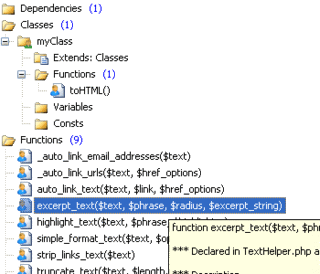
- Easily navigate your code with Code Explorer
- Lookup PHP function parameters with Function Hints
- Lookup functions, variables and properties with Auto Complete
- Debug PHP code with xDebug debugger
- Validate PHP code with Syntax Check
- Realtime PHP Syntax Check as you type
- Built-in web server for easy PHP preview
- Integration with PHP, HTML and CSS documentation
- Save and open files directly from FTP/SFTP
- Project management and FTP/SFTP publishing
- SQL database connectivity (MySQL, PostgreSQL, Firebird, Interbase)
- Matching bracket highlighting
- Matching and missing HTML tag highlighting
- Search and Replace with Regular Expression Support
- Search and Replace in files
- Spell Checker for text in HTML code and TXT files
- Multi Item Clipboard
- Code snippet library and code templates
- Ready to use Code Templates
- Advanced HTML editing with Auto Complete, Inspector and other tools
- Advanced CSS editing with built-in CSS editor
- Advanced JavaScript editing with built-in JavaScript editor
- SVN Support via TortoiseSVN and shell menus from File Explorer
- Countless goodies (code collapse, line highlighting, text indentation etc.)
download links:
Rapidshare,
Megaupload,
Directclick here to download rapidPHP2007rar password: best-downloads-ever

AutoPlay Media Studio can help you to create your own CD/DVD autoruns, presentations, applications, with no need for programming knowledge.
Description:
Create your own custom autorun menus, interactive presentations, multimedia applications, and custom software in just minutes. Use your favorite content such as images, music, video, flash, text, and more, and simply drag n’ drop your way to amazing projects. To help you get started quickly we provide extra resources including video training, professional content add-ons, an online user forum, and much more!
Release Name: IndigoRose.AutoPlay.Media.Studio.v7.1.retail-FOSI
Size: 34.8MB
Links: Homepage
Download: Rapidshare.com, Torrent
this is an winzip upgrade code to pro all you need to download is winzip evaluation version and at the spash screen enter this code works 100%.
http://www.megaupload.com/?d=UI7P937M